
What the report shows
Built for the turnover between one tenant and the next.
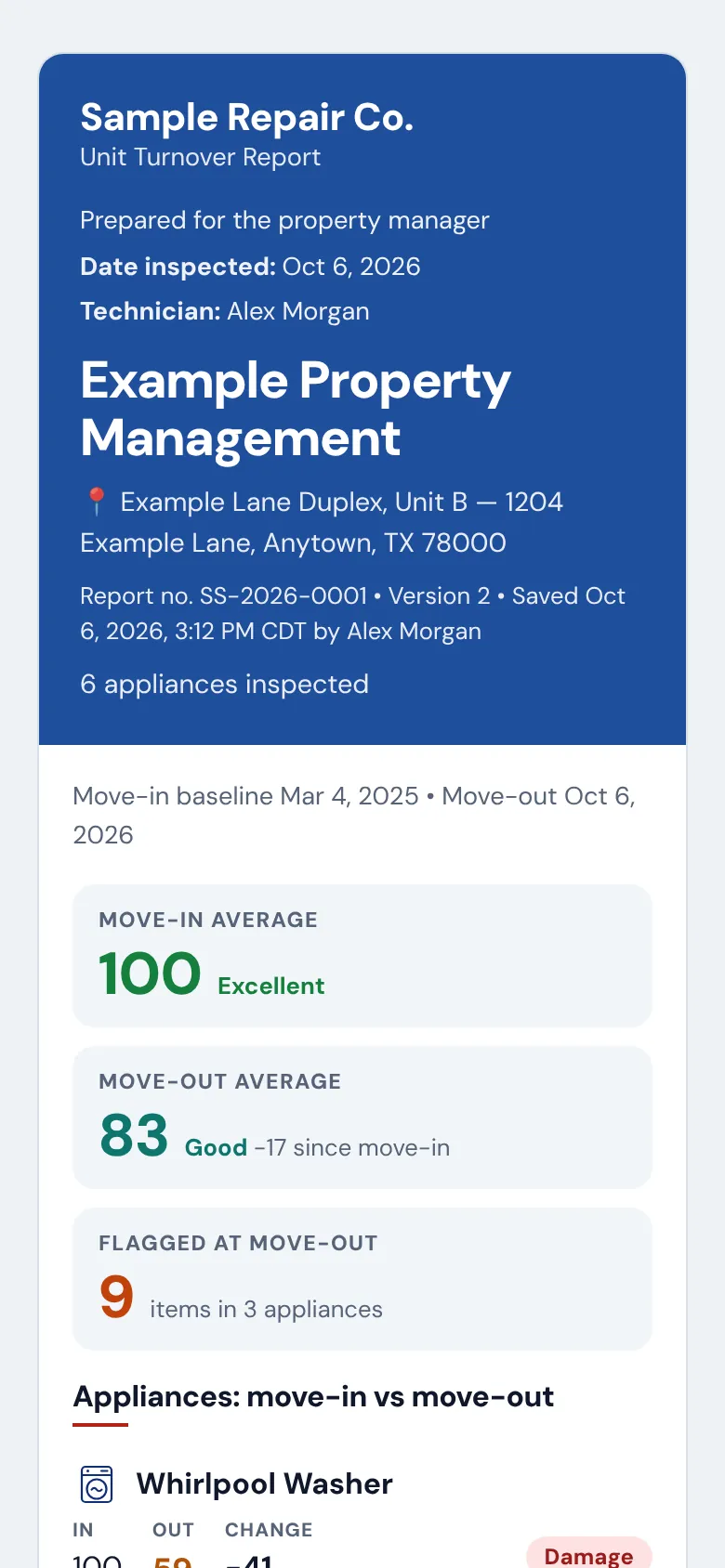
- Move-in against move-out. An average score for each, the change since move-in, and the number of items flagged at move-out.
- Each appliance, in and out. Its score at move-in, its score now and the change.
- A wear class for each problem: Normal wear, Upkeep, Damage or Pre-existing.
- Turnover actions with Owner and Tenant boxes, so it is clear who each item is for.
- Repair costs for the work your shop can do.
- Signature lines at the end of the report.
- A property address and unit on the report, with a report number.
How a shop uses it
Offer an inspection as a paid service, then repair what it finds.
Property managers often need the appliances in a unit checked between tenants. Run the inspection with the same phone and checklists you use on repair calls, then send the report as a PDF. The wear classes help sort what is ordinary aging from what needs fixing. It is also a way to meet property managers who are not repair customers yet.
The report records what your technician found. It does not decide who pays, and it is not legal advice.
Questions about this report
Do property managers get a customer link?
Not yet. Property manager reports are shared as a branded PDF. Customer links and approval work on Standard and Homeowner reports.
Do I need an earlier inspection to compare with?
Yes. The turnover report is built to compare move-out with a move-in baseline, so you pick the earlier inspection of that unit when you start.
Which plans include it?
Pro and Premium. Starter includes the Standard report only.