
What the record shows
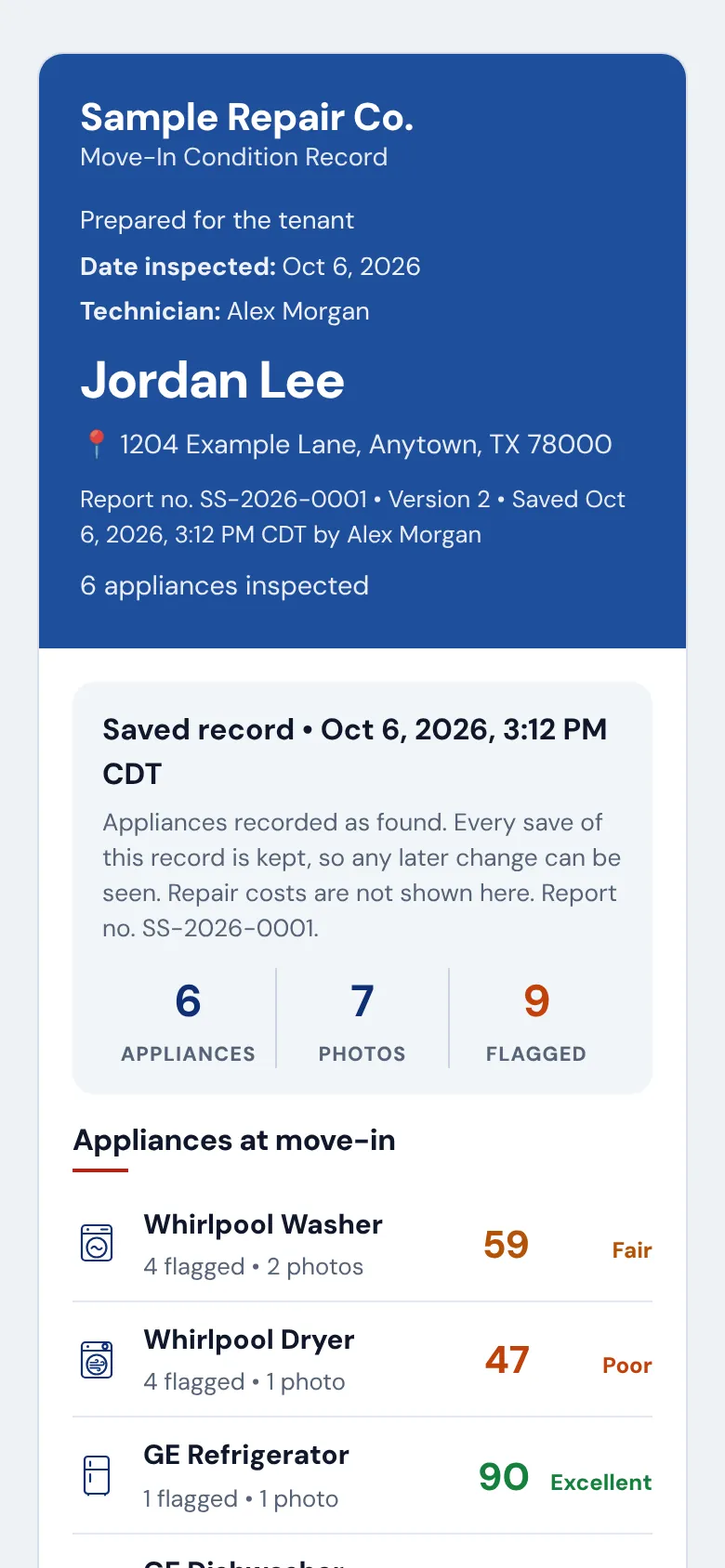
It is the Move-In Condition Record: appliances recorded as found.
- A saved record with the date and time, and a count of appliances, photos and flagged items.
- Each appliance with its score and rating, and what was flagged.
- Data-plate photos, so the model and serial number are on record.
- Signature lines at the end.
- No prices anywhere. It is a record, not an estimate.
- Every save is kept, so a later change can be seen.
Who it is for
Landlords and property managers who want a baseline, and the tenants who sign it.
A move-in record gives both sides the same picture on day one. A property manager report at move-out can then be compared with it. Your shop can offer the inspection as a paid service to property managers who are not repair customers yet.
The record is the condition your technician found. It is not a lease document or legal advice.
Questions about this report
Does the tenant report show prices?
No. The Move-In Condition Record shows no prices anywhere. It records how each appliance was found.
Is every save kept?
Yes. Every save of the record is kept, so any later change can be seen.
Which plans include it?
Pro and Premium. Starter includes the Standard report only.
The other report types
Standard
Your everyday repair customer, with repair estimates they can approve.
Homeowner
A yearly appliance checkup.
Property manager
A unit turnover report.